In this review, we explore Fotor AI photo enhancer, a tool that leverages artificial intelligence to upscale images effortlessly, offering high-quality resolution even when working with low-resolution images. Photography has greatly evolved with the advent of digital technology, and so have the tools used to enhance and optimize images.
Read More:
10 best free AI Image Upscalers
Fotor and 9 other BEST Free AI Image Generators
Barbie AI: BaiRBE.Me & Barbieselfie | Barbie Selfie Generator Online
Fotor AI Image Upscaler is an online tool that uses artificial intelligence to enlarge images while maintaining their quality. The tool is designed to transform low-resolution images into high-resolution ones without the common pixelation or blurriness issues associated with traditional upscaling methods. It’s a perfect tool for both personal and business needs, including web design, print, and social media posts.
Fotor Features and Use Cases

Fotor AI Image Upscaler has several key features:
- AI-Powered Image Upscaling: The tool uses AI technology to automatically upscale and enhance images, making them bigger and clearer.
- Quality Preservation: Unlike traditional upscaling methods, Fotor ensures that the image quality isn’t compromised during the upscaling process.
- One-Click Operation: The upscaling process is as simple as uploading an image and clicking a button. No technical skills are required.
- Real-Time Processing: The tool processes images in real time, delivering high-resolution results instantly.
- Versatility: The tool is capable of upscaling different types of images, including portraits, anime pictures, digital art, and logos.
Fotor AI Photo enhancer User Experience

Users have reported a generally positive experience with the Fotor AI Image Upscaler. They commend its ease of use, as it requires no technical expertise to navigate. The one-click operation simplifies the image upscaling process, reducing it to a matter of seconds.
The real-time processing of images is another feature that users appreciate, as it allows them to see the results instantly. This feature is particularly useful for users who need to upscale multiple images quickly.
The tool’s ability to maintain the quality of images during the upscaling process is also a significant selling point. Users have reported that their upscaled images retain their original clarity and sharpness, without any signs of blurriness or pixelation.
Fotor AI image upscaler Pricing

Fotor AI Image Upscaler offers a free version with limited features. For full access to all features and functionalities, users can opt for a premium subscription.
- Fotor Basic: Free
- Basic Editing Features
- Basic Design Features
- Basic Collage Layouts & Features
- Non-HD download with watermark
- Fotor Pro: US$4.49/month (50% off) – US$1.66/$20 year
- Basic Editing Features
- Basic Design Features
- Basic Collage Layouts & Features
- Advanced Editing Features
- Batch Editing
- AI Photo Enhancer
- AI Background Remover
- AI Object Remover
- AI Generated Content (AIGC)
- AI Photo Effect
- HD download without watermark
- AI Colorize
- Templates: 50,000+
- Fonts: 523
- Creative Resources: 60,000+
- Cloud Storage: 2G
- File Format: High-resolution JPG/PNG/PDF & transparent PNG
- Brand Kits
- Ad-free
- Extra Credits: 100 Credits/Month
- Fotor Pro+: $9.99/month (50% off) – US$3.74/$49.99 year
- All features of Fotor Pro
- HD download without watermark
- Templates: 100,000+
- Fonts: 523 & upload fonts
- Creative Resources: 60,000+
- Cloud Storage: 10G
- Brand Kits
- Ad-free
- Extra Credits: 300 Credits/Month
These pricing tiers offer increasing levels of functionality and resources, including basic and advanced editing features, design capabilities, collage layouts, AI-powered enhancements, removal tools, photo effects, colorization, templates, fonts, creative resources, cloud storage, and brand kits. The Pro+ tier provides higher limits on templates, fonts, and cloud storage compared to the Pro tier. Both Pro and Pro+ tiers offer ad-free usage and additional monthly credits for creative assets.
Pros and Cons
Just like any other tool, Fotor AI Image Upscaler has its strengths and weaknesses.
Some of the pros include:
- Ease of use: The tool’s user-friendly interface makes it easy for anyone to upscale images, regardless of their technical expertise.
- Quality preservation: Fotor preserves the quality of images during the upscaling process, ensuring that the final results are clear and sharp.
- Fast processing: The tool processes images in real time, delivering high-resolution results instantly.
However, the tool also has some cons:
- Limited features in the free version: The free version of the tool offers limited features, which may not be sufficient for users with more complex needs.
- Subscription required for full access: To access all the tool’s features and functionalities, users need to subscribe to the premium version.
Similar Tools
While Fotor Image Upscaler is a standout tool in the AI image upscaling landscape, it’s worth mentioning some similar tools that offer comparable features and functionalities. These tools can serve as alternatives for users who are looking for a range of options to choose from. Some notable alternatives include:
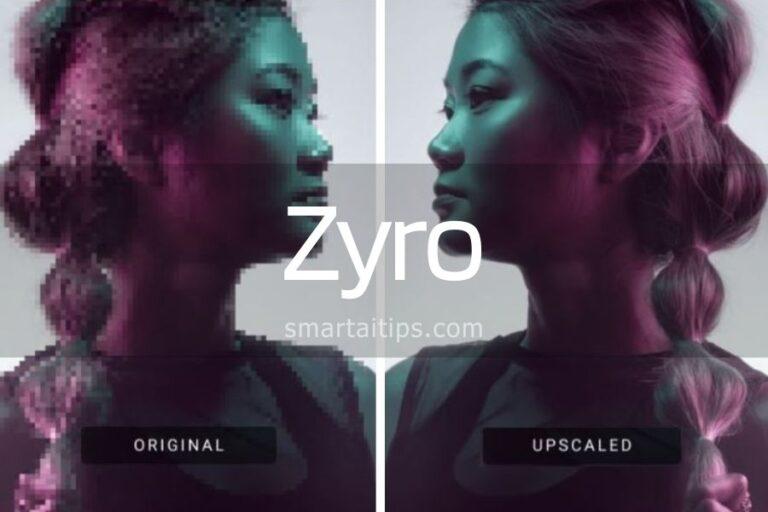
- Zyro AI Photo upscaler: A versatile AI image upscaler that offers various scaling options and advanced image enhancement features.
- VanceAI Image Upscaler: An intuitive image upscaling tool powered by AI algorithms, designed to enhance image resolution and details effortlessly.
- Restorephotos.io: A user-friendly AI image upscaler that provides quick and efficient image enhancement capabilities, catering to a diverse range of needs.
Our verdict on Fotor AI image upscaler
Fotor AI Image Upscaler is an impressive tool that offers a simple and effective solution for image upscaling and so much more. The user experience and user interface are very intuitive and some parts look similar to Canva. Its artificial intelligence technology ensures that images are upscaled without compromising their quality, making it a valuable tool for both personal and business use.
AI Image Upscalers | Fotor AI Alternatives